Examples
2D Refocusing of an HL60 cell
The data show a live HL60 cell imaged with quadriwave lateral shearing interferometry (SID4Bio, Phasics S.A., France). The diameter of the cell is about 20µm.
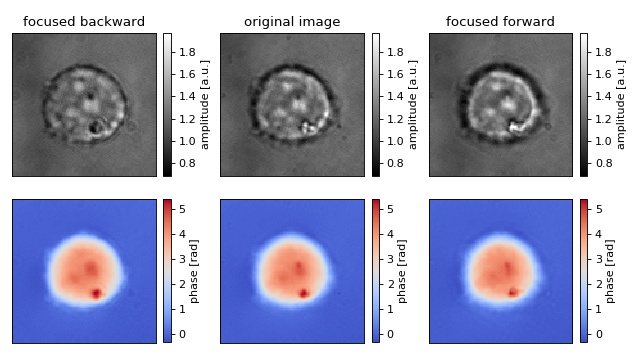
 1import matplotlib.pylab as plt
 2from skimage.restoration import unwrap_phase
 3import numpy as np
 4
 5import nrefocus
 6
 7from example_helper import load_cell
 8
 9# load initial cell
10cell1 = load_cell("HL60_field.zip")
11
12# refocus to two different positions
13cell2 = nrefocus.refocus(cell1, 15, 1, 1)  # forward
14cell3 = nrefocus.refocus(cell1, -15, 1, 1)  # backward
15
16# amplitude range
17vmina = np.min(np.abs(cell1))
18vmaxa = np.max(np.abs(cell1))
19ampkw = {"cmap": plt.get_cmap("gray"),
20         "vmin": vmina,
21         "vmax": vmaxa}
22
23# phase range
24cell1p = unwrap_phase(np.angle(cell1))
25cell2p = unwrap_phase(np.angle(cell2))
26cell3p = unwrap_phase(np.angle(cell3))
27vminp = np.min(cell1p)
28vmaxp = np.max(cell1p)
29phakw = {"cmap": plt.get_cmap("coolwarm"),
30         "vmin": vminp,
31         "vmax": vmaxp}
32
33# plots
34fig, axes = plt.subplots(2, 3, figsize=(8, 4.5))
35axes = axes.flatten()
36for ax in axes:
37    ax.xaxis.set_major_locator(plt.NullLocator())
38    ax.yaxis.set_major_locator(plt.NullLocator())
39
40# titles
41axes[0].set_title("focused backward")
42axes[1].set_title("original image")
43axes[2].set_title("focused forward")
44
45# data
46mapamp = axes[0].imshow(np.abs(cell3), **ampkw)
47axes[1].imshow(np.abs(cell1), **ampkw)
48axes[2].imshow(np.abs(cell2), **ampkw)
49mappha = axes[3].imshow(cell3p, **phakw)
50axes[4].imshow(cell1p, **phakw)
51axes[5].imshow(cell2p, **phakw)
52
53# colobars
54cbkwargs = {"fraction": 0.045}
55plt.colorbar(mapamp, ax=axes[0], label="amplitude [a.u.]", **cbkwargs)
56plt.colorbar(mapamp, ax=axes[1], label="amplitude [a.u.]", **cbkwargs)
57plt.colorbar(mapamp, ax=axes[2], label="amplitude [a.u.]", **cbkwargs)
58plt.colorbar(mappha, ax=axes[3], label="phase [rad]", **cbkwargs)
59plt.colorbar(mappha, ax=axes[4], label="phase [rad]", **cbkwargs)
60plt.colorbar(mappha, ax=axes[5], label="phase [rad]", **cbkwargs)
61
62plt.suptitle("Refocused cell on CPU with Numpy")
63plt.tight_layout()
64plt.show()
Compare available Metrics for Refocusing
The HL60 cell data used is described in refocus_cell.py.
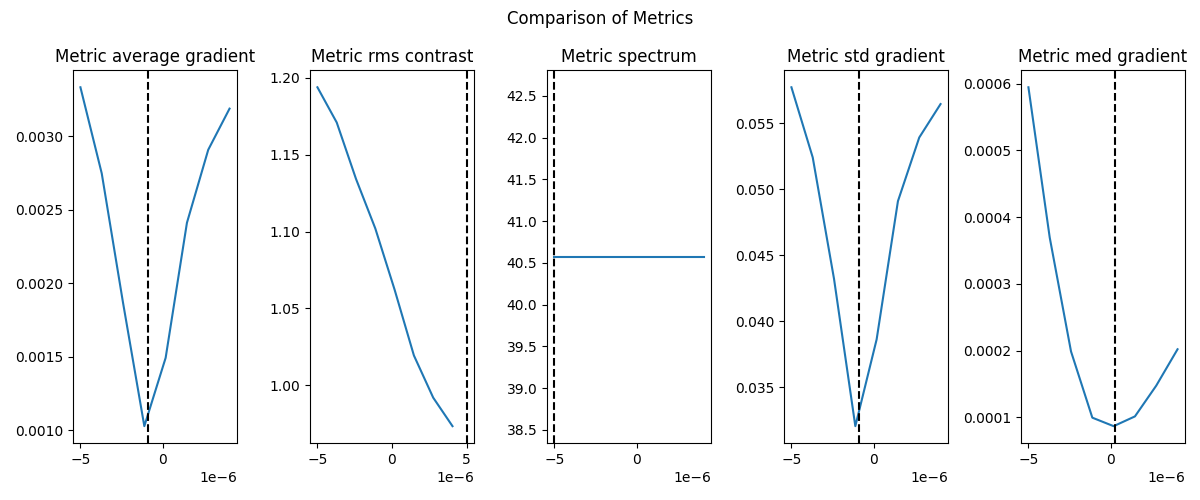
 1import nrefocus
 2from nrefocus.metrics import METRICS
 3import matplotlib.pyplot as plt
 4
 5from examples.example_helper import load_cell
 6
 7nrefocus.set_ndarray_backend("cupy")
 8
 9dataset = load_cell("HL60_field.zip")
10
11# load initial cell and create rf object
12rf = nrefocus.iface.RefocusCupy(field=dataset,
13                                wavelength=647e-9,
14                                pixel_size=0.139e-6,
15                                kernel="helmholtz")
16
17# autofocus the image for each metric
18my_metrics = list(METRICS.keys())
19
20fig, axes = plt.subplots(1, len(my_metrics), figsize=(12, 5))
21
22for i, mt in enumerate(my_metrics):
23    af_vals = rf.autofocus(metric=mt,
24                           minimizer="legacy",
25                           interval=(-5e-6, 5e-6),
26                           ret_field=True,
27                           ret_grid=True)
28    d, grid, field = af_vals
29    d = d.get()
30    field = field.get()
31    grid_0 = grid[0].get()
32    grid_1 = grid[1].get()
33
34    axes[i].plot(grid_0, grid_1)
35    axes[i].axvline(d, color='k', ls='--')
36    axes[i].set_title(f"Metric {mt}")
37
38fig.suptitle("Comparison of Metrics")
39fig.tight_layout()
40plt.show()
Refocus a stack of 2D fields (3D array input).
This example shows how to refocus a stack shaped (n, y, x). nrefocus interprets the last two axes as spatial axes and broadcasts over any leading “batch” axes.
 1import numpy as np
 2
 3import nrefocus
 4
 5rng = np.random.default_rng(0)
 6
 7# Synthetic complex field stack: (n, y, x)
 8n, ny, nx = 5, 128, 96
 9amp = 1 + 0.1 * rng.normal(size=(n, ny, nx))
10pha = 0.3 * rng.normal(size=(n, ny, nx))
11field = amp * np.exp(1j * pha)
12
13pixel_size = 1e-6
14dist = 2.13 * pixel_size
15
16# CPU (NumPy) refocus of the entire stack in one call
17rf = nrefocus.RefocusNumpy(
18    field=field,
19    wavelength=8.25 * pixel_size,
20    pixel_size=pixel_size,
21    medium_index=1.533,
22    distance=0,
23    kernel="helmholtz",
24    padding=True,
25)
26refocused = rf.propagate(distance=dist)
27print("nrefocus now accepts stacks of 2D arrays (3D input)!\n"
28      "Input shape:", field.shape, "| Output shape-> ", refocused.shape)
Specifying input_domain / output_domain in nrefocus.
As of version 0.6.2, users can specify in which domain the input and output data exists. The options are ‘spatial’ (default behaviour) and ‘fourier’. These can be used in conjunction with qpretrieve’s ‘output_domain’ to reduce the number of Fourier transforms in a given pipeline (see https://qpretrieve.readthedocs.io/).
Each of the three subplots below produce the same spatial result when padding=False. Note that qpretrieve is not used in this example.
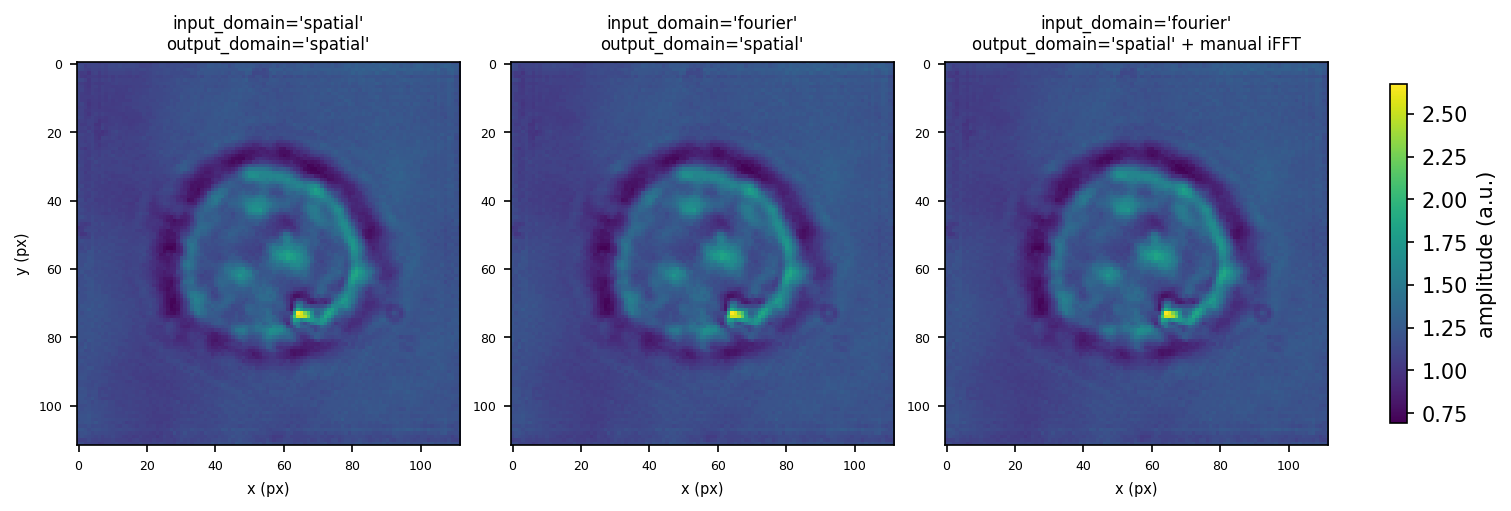
 1import matplotlib.pyplot as plt
 2import numpy as np
 3import nrefocus
 4
 5from example_helper import load_cell
 6
 7field = load_cell("HL60_field.zip")
 8fft_field = np.fft.fftshift(np.fft.fft2(field))
 9
10propagation_kwargs = dict(d=15, nm=1, res=1, method="helmholtz", padding=False)
11
12# 1. default (spatial in, spatial out)
13refocused_spatial = nrefocus.refocus(field=field, **propagation_kwargs)
14
15# 2. fourier input (skip forward FFT)
16refocused_fourier_in = nrefocus.refocus(
17    field=fft_field,
18    input_domain="fourier",
19    **propagation_kwargs,
20)
21
22# 3. fourier output, then manual iFFT
23refocused_fft_out = nrefocus.refocus(
24    field=field,
25    output_domain="fourier",
26    **propagation_kwargs,
27)
28# if the field came from qpretrieve, we could use the new feature
29# `oah.compute_field(refocused_fft_out)`
30refocused_from_fft_out = np.fft.ifft2(np.fft.ifftshift(refocused_fft_out))
31
32assert np.allclose(refocused_spatial, refocused_fourier_in, atol=1e-12), (
33    "1 and 2 differ.")
34assert np.allclose(refocused_spatial, refocused_from_fft_out, atol=1e-12), (
35    "1 and 3 differ after iFFT.")
36print("All outputs match:", True)
37
38# plot the output fields
39amp = [
40    np.abs(refocused_spatial),
41    np.abs(refocused_fourier_in),
42    np.abs(refocused_from_fft_out),
43]
44titles = [
45    "input_domain='spatial'\noutput_domain='spatial'",
46    "input_domain='fourier'\noutput_domain='spatial'",
47    "input_domain='fourier'\noutput_domain='spatial' + manual iFFT",
48]
49
50vmin = min(a.min() for a in amp)
51vmax = max(a.max() for a in amp)
52
53fig, axes = plt.subplots(1, 3, figsize=(10, 3.2), constrained_layout=True)
54for ax, a, title in zip(axes, amp, titles):
55    im = ax.imshow(a, cmap="viridis", vmin=vmin, vmax=vmax)
56    ax.set_title(title, fontsize=8)
57    ax.set_xlabel("x (px)", fontsize=7)
58    ax.tick_params(labelsize=6)
59axes[0].set_ylabel("y (px)", fontsize=7)
60
61fig.colorbar(im, ax=axes, label="amplitude (a.u.)", shrink=0.8)
62plt.savefig("input_output_domains.png", dpi=150, bbox_inches="tight")
63plt.show()